
 Available
Browser access for QuickBooks Desktop · AI built in
Your QuickBooks Desktop company, open in a browser
Install a small agent on the PC that runs QuickBooks and your team gets a secure web portal in two-way sync with the company file. Create invoices, receive payments, pay bills and run QuickBooks' own reports from anywhere — drop in a PDF bill and AI fills in the entry, or just ask your books a question. The company file never leaves your office.
- Two-way sync
- AI bill capture
- Ask your books
- No remote desktop
- Live QuickBooks reports
- Works with
- QuickBooks Desktop 2022+
- Editions
- Pro, Premier, Enterprise (US)
- Network
- Outbound only, no open ports
- Access from
- Any browser, phone included
How it works
A mirror of your company file, kept in step both ways
The QBWebSync agent runs on the Windows PC where QuickBooks Desktop is installed. It talks to QuickBooks through Intuit's SDK and dials out to the QBWebSync cloud over an encrypted connection — there is nothing to open on your firewall and no server to maintain.
Changes made in the portal are pushed into QuickBooks within seconds while QuickBooks is open. Records created in QuickBooks come back into the portal on the next pull. If the same record changed in both places, QuickBooks wins and the difference lands in a conflict list for someone to review.
- Installer with a one-time pairing code
- Encrypted, outbound-only connection
- Guards against syncing into the wrong company file
AI bill capture
Drop in a vendor bill. The entry fills itself in.
On Enter Bills, upload a PDF or a photo of a vendor bill. QBWebSync reads it and fills in the vendor, bill number, dates, terms, line items and tax. It matches the vendor to your QuickBooks vendor list and picks accounts based on that vendor's past bills.
Fields it is not sure about are highlighted rather than silently filled, and it warns you when the lines do not add up to the bill total. Nothing goes to QuickBooks until you click Save — then the bill syncs the normal way, with the original document attached.
- Vendor matched to your QuickBooks list
- Accounts picked from that vendor's history
- Uncertain fields highlighted, totals checked
- Nothing reaches QuickBooks until you save
Invoice INV-88213 · Net 30
- Vendor
- Delta Freight Lines
- ✓ Matched in QuickBooks
- Ref no.
- INV-88213
- Bill date
- 09/22/2026
- Due
- 10/22/2026 · Net 30
- Freight — Chicago to DetroitFreight & Delivery1,250.00
- Fuel surchargeFreight & Delivery· please check187.50
- Liftgate serviceFreight & Delivery95.00
Ask your books
Plain-English questions, answered from your own QuickBooks data
Who owes us the most? Which invoices are overdue? What were our top five items this year? Ask from the dashboard or the chat button in the corner, and get the answer in seconds.
Every answer shows where the numbers came from and when that data last synced. If the data is not synced, it says so instead of guessing. It is read-only — it cannot change anything in your books.
- Answers cite their source and sync time
- Read-only — it cannot change your books
- Says so when data is not synced
Ask your books AI
Read-only · this company’s synced data and live QuickBooks reports
Who owes us the most?
The biggest balance is Campbell, Heather: Remodel — $13,900.00 open on one invoice (no. 1092, due 12/25).
Next: Mackey’s Nursery and Garden Supply at $13,900.00, then Robson Clinic at $12,420.98.
Which invoices are overdue?
Coverage
What syncs today
Coverage grows with each release. This is the current list.
| QuickBooks data | In the portal |
|---|---|
| Customers and jobs, with ship-to addresses and custom fields | Two-way |
| Vendors | Two-way |
| Service, non-inventory, other charge and inventory items | Two-way |
| Invoices, with line items | Two-way |
| Receive payments, applied to invoices | Two-way |
| Bills | Two-way |
| Bill payments | Two-way |
| Chart of accounts, terms, tax codes, price levels, sales reps and other lists | View |
| Profit & Loss, Balance Sheet, A/R and A/P Aging, QuickReports | Run live in QuickBooks |
Sales orders, estimates, sales receipts and credit memos are next on the roadmap.
Compared
Four ways to reach QuickBooks Desktop from outside the office
| Remote desktop | Hosted QuickBooks | Move to QuickBooks Online | QBWebSync | |
|---|---|---|---|---|
| Keep QuickBooks Desktop and your file | Yes | File moves to host | No | Yes |
| Works well on a phone | Poorly | Poorly | Yes | Yes |
| Several people at once | Needs seats and sessions | Needs seats | Yes | Yes |
| Ports, VPN or server to look after | Usually | No | No | No |
| Your history and workflows unchanged | Yes | Yes | Conversion needed | Yes |
| Enter bills from a PDF or photo | No | No | Yes | Yes |
Features
Built for the people who live in QuickBooks
Screens QuickBooks users already know
Customer, vendor, invoice and bill screens follow QuickBooks Desktop's own windows, so there is nothing new to learn. On a phone, tables turn into cards.
Reports from QuickBooks itself
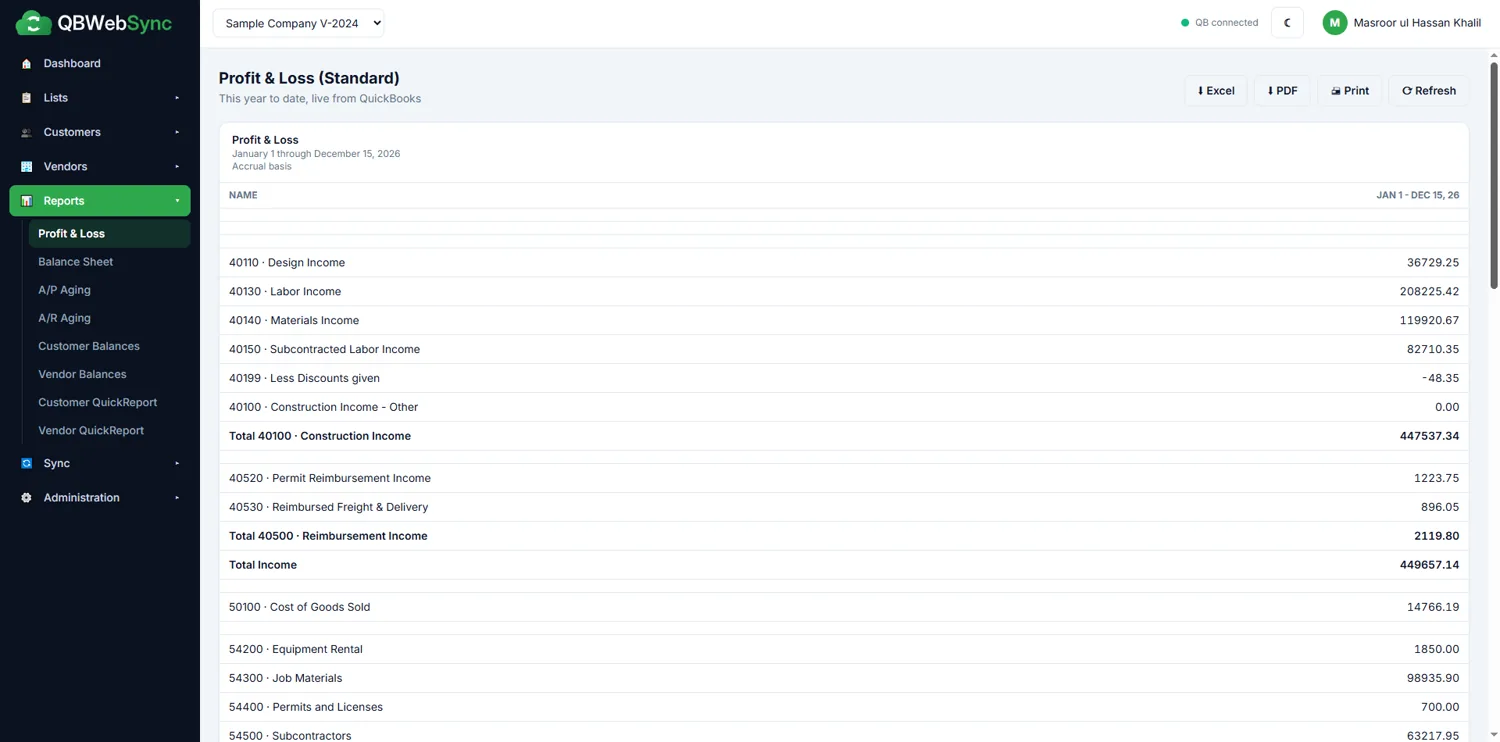
Reports run on QuickBooks' own engine and are stamped with the time they were generated, so the numbers match what you see on the desktop.
Conflict center
When a record changes in both places, QuickBooks wins and the difference waits for review.
Live sync status
Every record shows whether it is synced, pending, failed or in conflict — updated in real time.
Multiple company files
Connect several companies to one account and switch between them from the header.
Users, roles and your accountant
Invite staff and your accountant, and decide exactly what each role can see and change — without buying more QuickBooks seats for remote work.
Tour
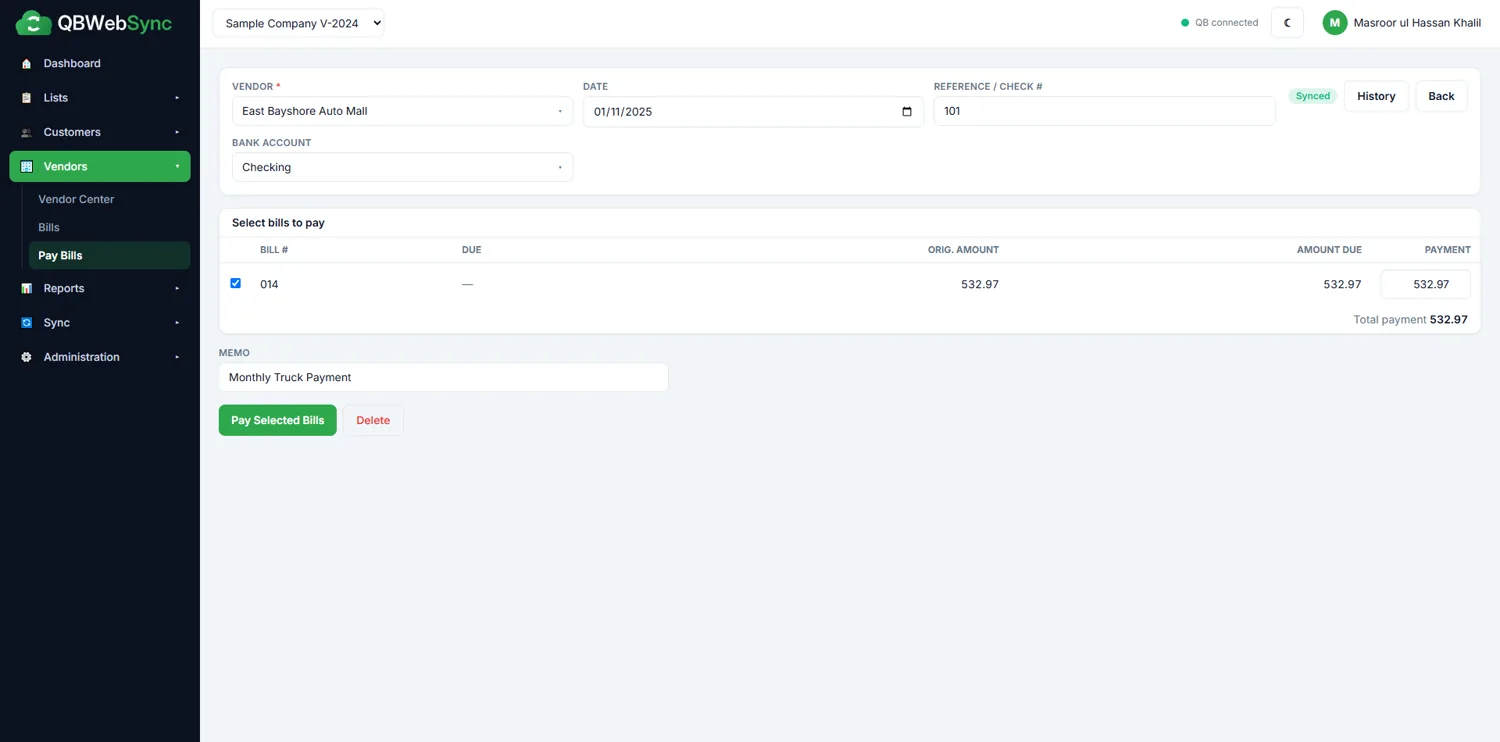
Inside the portal
Watch
A full sync, start to finish
Installing the agent, pairing a company file, editing in the browser and running a live Profit & Loss.
Pricing
QBWebSync pricing
Plans are priced by company files and users. Current plans, and the free demo with setup help, are on qbwebsync.com.
FAQ
QBWebSync questions
Is my QuickBooks company file uploaded?
No. The .QBW file stays on your PC. The agent reads and writes records through QuickBooks' own SDK and sends the data, not the file, to the portal.
Does QuickBooks have to be open?
For syncing, yes — QuickBooks must be running and logged in on that PC. Data that has already synced stays available in the portal when the PC is off.
Do I need to change my firewall or router?
No. The agent only makes outbound encrypted connections, the same way a browser does.
What happens if a record is edited in both places?
QuickBooks wins, and the portal shows the conflict with both versions so someone can decide what to keep.
Can my accountant use it?
Yes. Invite them as a user and give them the role that fits, such as read-only access to reports.
Which versions of QuickBooks are supported?
US editions of QuickBooks Desktop Pro, Premier and Enterprise, 2022 or newer, 64-bit. Older 32-bit versions are not supported.
Can the AI change my QuickBooks data?
No. Bill capture only fills in the Enter Bills form — nothing reaches QuickBooks until a person clicks Save, and then it syncs the normal way. Ask your books is read-only.
How accurate is AI bill capture?
It reads most clearly laid-out bills well, but it is built to be checked: fields it is unsure about are highlighted, and it warns you when the line items do not add up to the bill total. You always review before saving.
Can AI features be turned off?
Yes. An admin can switch AI off for the whole organization. Each organization also has daily and monthly AI usage limits, and every AI request is logged.
What you need
Requirements for QBWebSync.
- QuickBooks Desktop Pro, Premier or Enterprise 2022 or newer (64-bit, US edition)
- A Windows PC with QuickBooks installed, open and logged in while syncing
- An internet connection — outbound only, no port forwarding
- Admin approval once, for QuickBooks' permission prompt
More from Consus
Other QuickBooks apps
 Available
Check printing · QuickBooks Online
PrintCHECK
Print QuickBooks Online checks in your own layout, with an AI review before every batch.
- AI check review
- Ask your check register
 Available
Data export & BI · QuickBooks Desktop
QBSync
Sync QuickBooks Desktop data into SQL Server or MySQL on a schedule.
Explore QBSync Early access
Accounting platform · QuickBooks Desktop
GFS
Leave QuickBooks Desktop without relearning your books.
Explore GFSTry QBWebSync with your own QuickBooks data
Questions about fit, setup or pricing? Our team built the app and answers every message.