
 PrintCHECK
PrintCHECK · Blank stock
Print complete, bank-ready checks on blank stock from QuickBooks Online
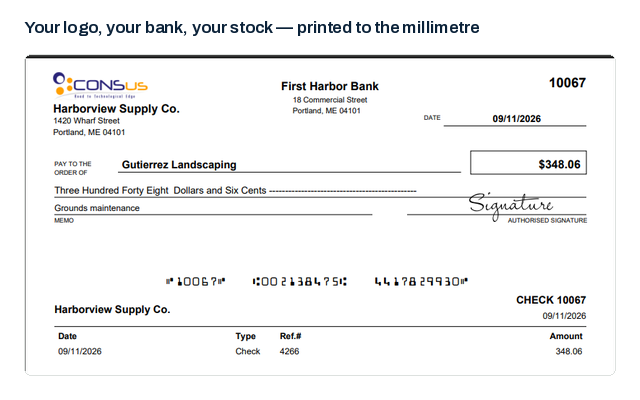
Pre-printed checks tie each box of paper to one bank account. Print on blank stock instead and PrintCHECK adds everything the pre-printer used to: the MICR line, bank name, fractional code, your logo and signatures.
Pre-printed versus blank stock
Pre-printed checks
- One stock per bank account
- Reorder when an account or address changes
- Starting number fixed by the printer
- Unused stock is wasted when things change
Blank stock with PrintCHECK
- One stock for every account
- Bank details come from settings, not the paper
- Numbering set per account in the app
- Change a detail and the next check reflects it
The MICR line
Printed where the reader expects it
The line of numbers along the bottom of a check is set in E-13B, the magnetic-ink font banks use to read the routing number, account number and check number automatically.
PrintCHECK builds that line from the bank account's settings and the check's number, and checks that nothing else on your layout strays into the clear band beneath it.
- Routing, account and check number in E-13B
- Clear-band check in the designer
- Works with MICR toner in a standard laser printer
What you need to print on blank stock
Paper
- Blank check stock with security features, in the layout you prefer — check on top, middle or bottom
Printer
- A laser printer; many banks recommend MICR toner for the magnetic line
Bank details
- Routing number, account number, fractional code and starting check number
FAQ
Frequently asked questions
Do I have to use MICR toner?
Requirements vary by bank. Many recommend magnetic MICR toner so the line reads reliably on their sorting equipment. Ask your bank, and test a check with them before switching fully.
Can I mix blank stock and pre-printed checks?
Yes. Each bank account has its own layout, so one account can print everything on blank stock while another keeps its pre-printed checks.
Is printing my own checks secure?
Use security-feature check stock, keep it locked up, and use PrintCHECK's roles so only certain people can print. Every print and void is recorded in the activity log.
More about PrintCHECK
See PrintCHECK with your own data
Imports every check and bill payment from QuickBooks Online, numbers them per bank account, reviews each batch for duplicates and unusual amounts, and prints it — MICR line included — on blank or pre-printed stock.